How to Remove Doxxing Content From Google (Step by Step)


Someone posted your home address, phone number, or other private details online. Now it shows up when people search your name.
That is doxxing. And it is one of the few problems where Google will actually take your side.
Google has a removal policy built for exactly this situation. Most people either do not know it exists or fill out the request wrong and get denied. This guide walks you through the whole process, step by step, with examples of what qualifies and what the request flow looks like.
Quick answer: To remove doxxing content from Google, document the content first with screenshots and URLs. Report it to the platform hosting it. Then submit Google’s “remove select personally identifiable info or doxxing content” request, available from the three-dot menu next to any search result. Google removes results that expose your contact info, and removal is even stronger when the content includes threats or calls to harass you. If the doxxing includes threats of violence, report it to police and the FBI at ic3.gov.
Table of contents
- What counts as doxxing content
- What Google will and will not remove
- Step 1: Document everything first
- Step 2: Report it to the platform
- Step 3: Submit the Google removal request
- Step 4: Verify the removal and monitor
- Step 5: Cut off the source
- If there are threats: go to law enforcement
- FAQ
What counts as doxxing content
Doxxing is publishing someone’s private information so others can find, contact, or harm them. The usual targets: home address, phone number, email, workplace, and family details.
Here is what it looks like in search results:
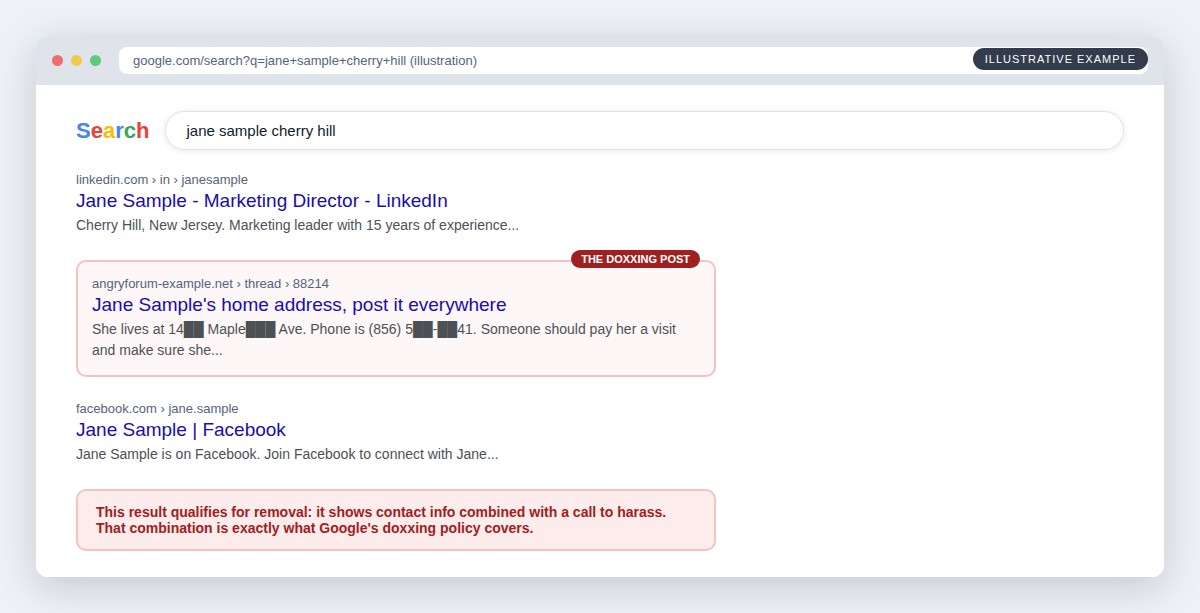
Notice what makes that middle result removable. It is not just that the page mentions a name. It shows contact info, and it pushes people to act on it. That combination matters, as you will see next.
What Google will and will not remove
Google removes search results in two related situations:
1. Your contact info is exposed. Home address, phone number, or email address showing up in results. Since 2022, Google removes this on request even without any threat attached. This also covers login credentials, ID numbers, and bank or card numbers.
2. Doxxing. Your contact info shared with intent to harm. Google looks for explicit or implicit threats, or explicit or implicit calls for others to harm or harass you. These requests carry the most weight.
What Google will not remove through this process: content that is merely negative, embarrassing, or critical without exposed contact info. Different problem, different playbook, and we cover it in our online reputation repair guide.
One more thing to burn into memory: Google removal hides the page from search. It does not delete the page. The content still exists on the site that published it. That is why the platform report in step 2 matters just as much.
Step 1: Document everything first
Before you report anything, build your evidence file. Removals sometimes make content vanish before you have proof, and if this ever becomes a police matter or a lawsuit, you will need the record.
- Screenshot the content itself, with the URL visible and the date included.
- Copy every URL: the page, the profile that posted it, and the search results page where it appears.
- Capture the surrounding context. Comments, shares, and reposts, because doxxing spreads.
- Save everything twice. Cloud folder plus a local copy.
Ten minutes of documentation now saves you weeks later.
Step 2: Report it to the platform
Every major platform bans doxxing. X, Reddit, Facebook, Discord, and most forums have specific “private information” or “doxxing” report categories. Use those exact categories, not the generic harassment flag, because they route to teams that handle this content faster.
If the content sits on a small independent site, look for a contact page or use a WHOIS lookup to find the hosting company. Hosts have abuse departments, and doxxing violates nearly every host’s terms.
Platform removal kills the page. Google removal kills the search visibility. You want both, and the platform report often works faster.
Step 3: Submit the Google removal request
Now the main event. The fastest path: search your name, find the doxxing result, click the three dots next to it, and choose “Remove result.” You can also start from Google’s “Remove select personally identifiable info or doxxing content” support page.
Here is what the request flow looks like:
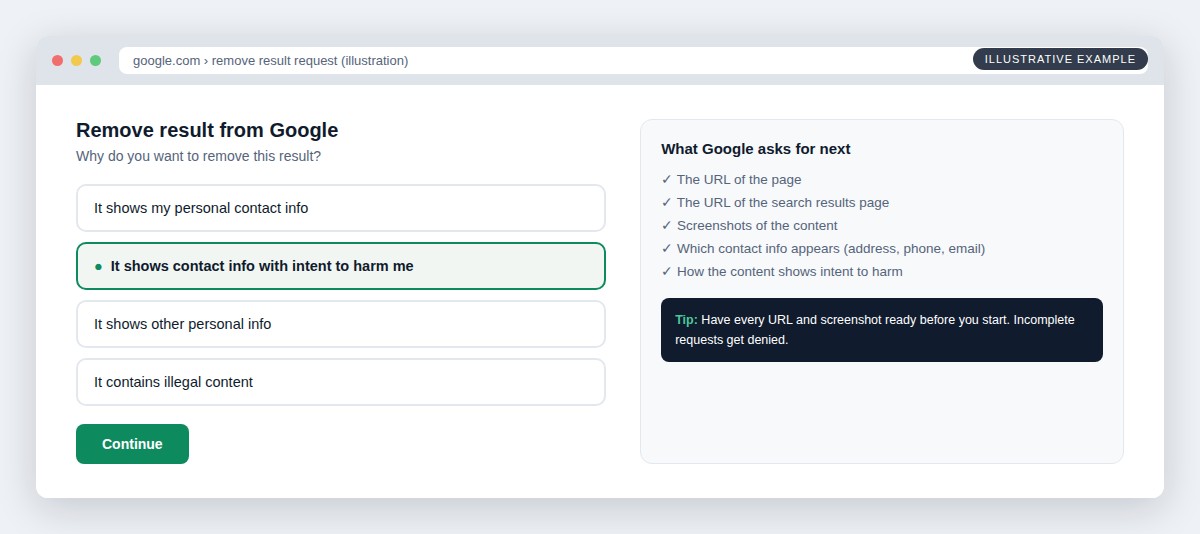
Three things that make requests succeed:
- Pick the right reason. If there are threats or calls to harass, choose the intent-to-harm option. It is the strongest category.
- Submit complete information. Google asks for the page URL, the search results URL, and screenshots. Incomplete requests get denied, and you start over.
- List every exposed detail. Address, phone, email. Name each one that appears on the page.
Google emails you a confirmation, then a decision. Timelines vary from days to a few weeks. If the request is denied and you believe it qualifies, you can resubmit with better documentation, and a denial on the contact-info reason does not stop you from trying the doxxing reason when threats exist.
Step 4: Verify the removal and monitor
When Google approves the request, the result stops appearing for searches of your name:
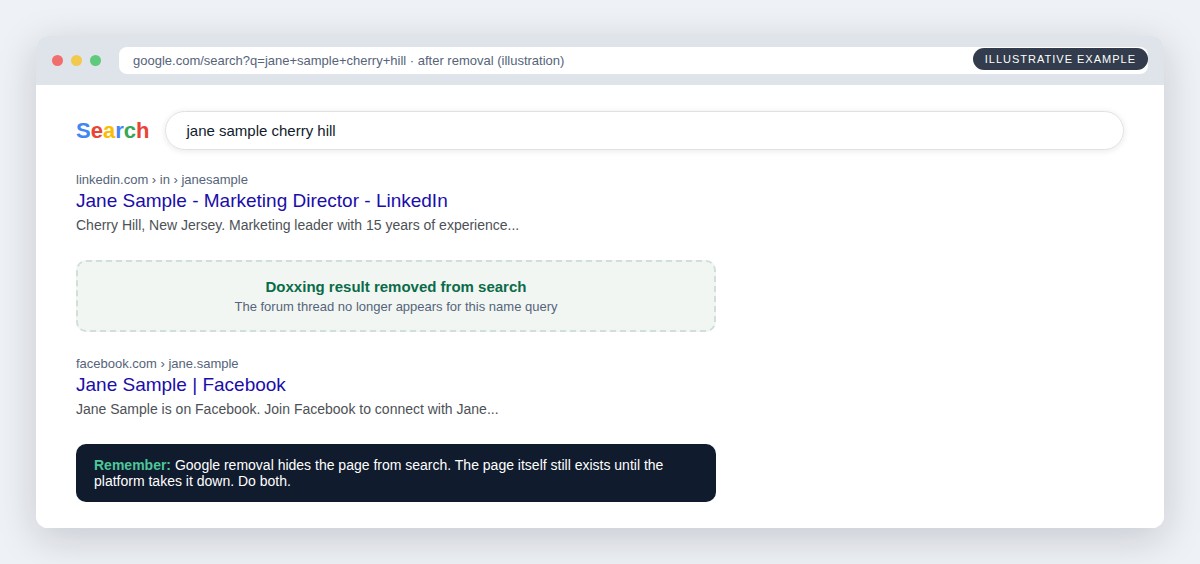
Do not stop there:
- Recheck in an incognito window a few days after approval, for your name plus city and other variations.
- Turn on Google’s “Results about you” tool. It is free and alerts you when your contact details show up in new results, which matters because doxxers repost.
- Watch for mirrors. Doxxing content gets copied to other sites. Each copy needs its own platform report and Google request.
Step 5: Cut off the source
Here is the question worth asking: where did the doxxer get your address in the first place?
Almost always, the answer is people-search sites. They pulled up your profile, paid a few dollars, and had everything they posted. Which means removing the doxxing post without removing the source data leaves the door open for round two.
Submit opt-outs to the major people-search sites, or use a removal service to handle the whole broker network and keep it handled. We compared the best options in our guide to the best personal data monitoring services.
If there are threats: go to law enforcement
Doxxing paired with threats of violence is a crime in many states, and threats across state lines can be a federal matter. If the content threatens you or your family:
- Report it to local police with your evidence file from step 1.
- File at ic3.gov, the FBI’s Internet Crime Complaint Center.
- Do not engage the doxxer. No replies, no arguments. Everything you say gets screenshotted and twisted.
- If intimate images are involved, the federal TAKE IT DOWN Act forces platforms to remove them within 48 hours of a valid request, and that includes AI-generated fakes.
A police report also strengthens every removal request you file afterward, with Google and with platforms.
Being doxxed right now?
Get help removing it
Tell us what was posted and where. A specialist reviews every request personally and replies within one business day. Free, confidential, no obligation.
FAQ
How do I remove doxxing content from Google?
Click the three dots next to the result and choose “Remove result,” or use Google’s removal request form for personally identifiable info and doxxing content. Provide the page URL, the search URL, screenshots, and the exposed details. Google removes results that show your contact info, and requests are strongest when the content includes threats or calls to harass.
How long does Google take to remove doxxing content?
Anywhere from a few days to a few weeks. You get an email confirmation when you submit and another when Google decides. Complete documentation speeds it up, and incomplete requests get denied.
Does Google removal delete the content?
No. It removes the page from Google search results, which kills most of its reach. The page itself stays up until the hosting platform takes it down, so always report to the platform too.
What if Google denies my request?
Resubmit with stronger documentation: clearer screenshots, every exposed detail named, and the threat language quoted if it exists. If contact info removal was denied, check whether the content qualifies under the doxxing category instead. Persistent, well-documented requests succeed where rushed ones fail.
Can I stop doxxing before it happens?
Mostly, yes. Doxxers get their material from people-search sites, so removing your profiles from those sites takes away the easy ammunition. Turn on Google’s “Results about you” alerts, lock down social media details like your neighborhood and workplace, and clean up the data brokers.
Doxxing feels like an ambush, but the removal process is on your side and it works. Document first, hit the platform and Google together, then close the source so it cannot happen twice. If the situation is bigger than one post, involves ongoing harassment, or you want someone to handle it start to finish, talk to us. One call, a clear plan, no obligation.

James Callahan
James Callahan handles the hardest category of reputation work: content the poster refuses to take down. Over more than a decade in this field he has filed and tracked thousands of removal requests across search engines, social platforms, forums, and hosting providers, building a working knowledge of which policy citations succeed and which get form-letter denials. He follows platform policy changes and removal legislation closely, including the TAKE IT DOWN Act's notice-and-removal requirements, and updates this site's removal guides as those rules take effect. James is not an attorney and is careful to flag where a situation needs one; his specialty is the platform side, meaning reports, escalations, and the documented processes that get results without a courtroom. He writes about platform reporting, non-consensual imagery removal, mugshot sites, and forum content.
Get the reputation brief
Industry news, removal guides, and privacy tactics. One email a week, no spam, unsubscribe anytime.
We use your email only to send the newsletter. Read our privacy policy.