How to Remove Negative Google Reviews

Quick answer
You cannot delete a Google review just because it is negative. But reviews that break Google’s policies, such as fake reviews, off-topic rants, competitor attacks, or posts with profanity or personal information, can be flagged and removed. Report the review through Google, respond professionally to the honest ones that stay, and build a steady flow of new reviews so a single bad one carries less weight.
A single one-star review can cost a business real money. It is often the first thing a potential customer sees. The instinct is to get it deleted, but Google does not remove reviews on request. It removes reviews that break its rules. Knowing the difference is the whole game.
Can you remove a Google review?
Sometimes. Google will remove a review that violates its content policies, but not one that is simply critical. So your first job is to decide which kind you are dealing with. If the review breaks a rule, you flag it. If it is an honest complaint, you respond to it. Trying to delete a legitimate review wastes time and can make you look worse.
What Google will and will not remove
Here is the quick test before you file anything.
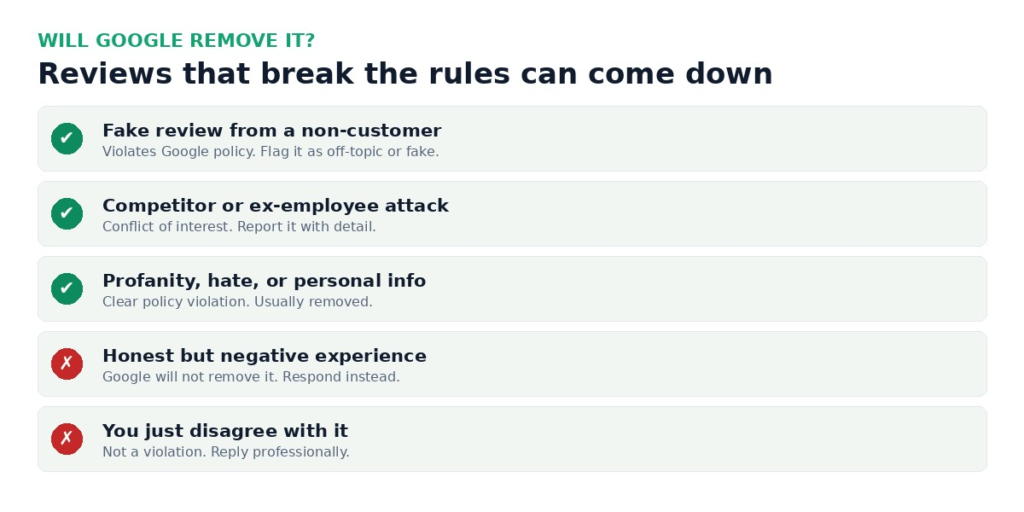
Fake reviews from people who were never customers, reviews posted by competitors or former employees, and reviews containing profanity, hate, or personal information all violate Google’s policies and can be removed. An honest account of a bad experience does not, no matter how much it stings.
How to flag a review
To report a policy-violating review, open your Google Business Profile, find the review, click the three dots, and choose “Report review.” Pick the reason that matches the violation. Then be patient, because Google’s automated review can take several days. If nothing happens, follow up through Google Business Profile support and explain, in specific terms, which policy the review breaks.
When flagging fails
Google does not remove every review that deserves it. If a clear violation survives, escalate through support with evidence, and consider whether the review is defamatory rather than just negative, which is a legal question worth asking a lawyer. For reviews that are simply unflattering, the better play is to outweigh them. This is the same suppression logic behind broader online reputation repair: you cannot always erase the bad, so you build up the good.
Respond to the reviews you cannot remove
Future customers read your replies more closely than the reviews themselves. A calm, specific response to a negative review builds more trust than a page of five stars. Acknowledge what is fair, correct what is false, and move the conversation offline with a phone number or email. Never argue in the thread. Then ask happy customers for honest reviews, so your rating reflects reality. If reviews are only one part of a larger problem, our reputation services can help you build a plan.
Frequently asked questions
How do I remove a negative Google review?
You can only remove a review that breaks Google’s policies, such as a fake review, a competitor attack, or one with profanity or personal information. Report it through your Google Business Profile, then follow up with support if it is not removed. Honest negative reviews cannot be deleted, so respond to those instead.
Can I delete a bad review just because it hurts my business?
No. Google only removes reviews that violate its content policies. An honest but negative review will stay, so the best response is a professional reply and a steady flow of new, genuine reviews.
How long does Google take to remove a flagged review?
Usually a few days for the automated review, though it can take longer. If the review clearly violates policy and is not removed, escalate through Google Business Profile support.
What if the review is fake?
Fake reviews from people who were never customers violate Google’s policies. Report the review as fake or off-topic and include any detail that shows the reviewer was never a customer.

Erin Delgado
Erin Delgado covers the review economy: Google, Yelp, industry platforms, and the small businesses whose revenue rises and falls with them. She spent years managing digital presence for local service businesses, where she dealt with review attacks, competitor flagging abuse, and the slow grind of rebuilding a star rating the legitimate way. That frontline experience shapes her coverage. Erin tests review platforms' flagging and dispute processes herself, tracks their policy changes, and interviews business owners about what worked and what wasted their money. She is skeptical of shortcuts by default and says so when a popular tactic violates platform rules or state law. She writes about review removal and disputes, review generation done legally, Google Business Profile issues, and local reputation recovery.
Get the reputation brief
Industry news, removal guides, and privacy tactics. One email a week, no spam, unsubscribe anytime.
We use your email only to send the newsletter. Read our privacy policy.